
Watching for an outage
A watch is not a load test. It samples a request on a fixed interval with a short timeout, and answers one question: how long was the service unreachable?
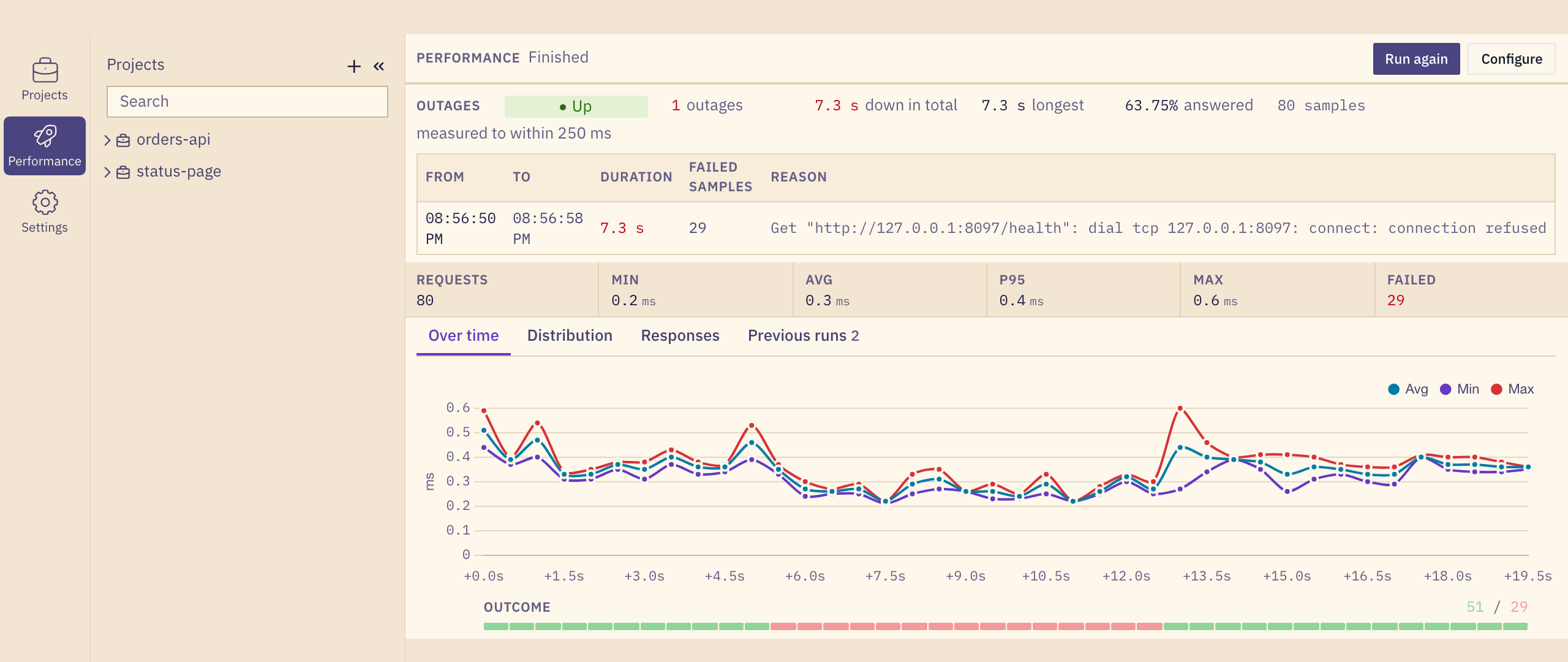
It is built for tuning high availability. Start a watch, then pull a node, fail over the database or roll out a release, and the outage log tells you what each step actually cost your clients. Change the setup and run it again to see whether the gap got shorter.
Starting a watch
- Open Performance and pick the requests to watch, for example a health endpoint and a login.
- Choose the Watch profile.
- Set the interval and the timeout. The timeout is required: with a long one, a failover arrives as one slow request instead of an outage.
- Leave the duration empty to watch until you stop it.
Each request can have its own interval, so a login checked every few seconds and a health endpoint checked twice a second can share one run.
The outage log
Every outage is listed from its first failed sample to its last, with its duration, the number of failed samples and the reason. The log is exact: a two second outage inside a twenty minute watch is never rounded away.
An outage is known only to within one interval, and gurl says so beside the numbers.